


After you apply for OSAP and submit all of your required documents, here is what you can expect:
Confirmation of Enrolment
- 10 business days before the start of the term, we will automatically begin to confirm enrolment if your application is complete.
- Your registration status must be registered on ACORN.
- Your academic information on ACORN must match your OSAP application. This includes: program of study, level of study, and enrolment in a minimum course load. Waitlisted and interim courses are not counted toward your total course load.
If your information has changed, download the Financial Aid Change Form and uploading it directly to your OSAP account.
When Funding is Released
- 7-10 business days after your enrolment is confirmed, your funding will be distributed to the university to pay any outstanding fee balance on your ACORN account for the current term or session. Any leftover amounts (i.e., a credit balance) will be disbursed into your bank account.
How Funding is Released (Full-time Students Only)
| Funds are released twice per year |
|
|---|---|
| OSAP Instalments |
|
| If You are Receiving OSAP and a U of T Award/Scholarship |
|
How Much is Being Released and When?
Monitor your OSAP funding online.
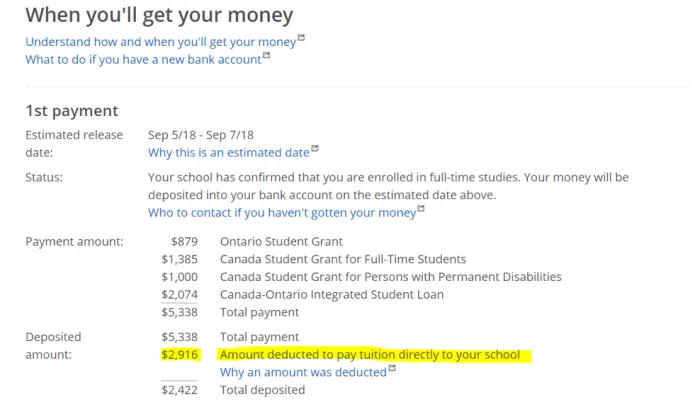
- Login to the OSAP website, and click "Check Status", then "View Payment Schedule" for status updates regarding your loan, your total funding assessment, and confirmation of when and how much funding will be credited directly to your ACORN account. Example can be found in the image below:
Getting Your OSAP
- Ensure that you have uploaded all of the required supporting documentation to your OSAP account. Students are encouraged to submit any missing documents early as it can take approximately 4 weeks for documents to be processed.
- Verify that you are enrolled in the minimum required course load required for your funding to be released (see below).
Minimum Course Load Requirements
- OSAP requires that you enrol in and maintain a minimum of 1.5 credits in each of the Fall and Winter term(s) to remain eligible for continued financial assistance.
- Waitlisted courses do not count towards this minimum.
- For students with a documented permanent disability, or documented persistent or prolonged disability, this minimum is 1.0 credits per term.
Fall-Winter Full-time Course Load Requirements
| Study Period | General Requirements | |
|---|---|---|
| Minimum Credit(s) to receive OSAP (60% of a full course load) | Must Pass | |
| September to April | 3.0 (1.5 credits per term) | 3.0 |
| September to December | 1.5 | 1.5 |
| January to April | 1.5 | 1.5 |
| Study Period | Requirements for students with documented permanent/persistent or prolonged disabilities | |
|---|---|---|
| Minimum Credit(s) to receive OSAP (40% of a full course load) | Must Pass | |
| September to April | 2.0 (1.0 credit per term) | 2.0 |
| September to December | 1.0 | 1.0 |
| January to April | 1.0 | 1.0 |
Refer to the Important Dates page for current deadlines for adding courses.
Your Net Cost Amount on ACORN
What is Net Cost?
- Simply put, net cost is your remaining tuition balance that you are responsible for paying out of pocket if OSAP is your only source of financial aid.
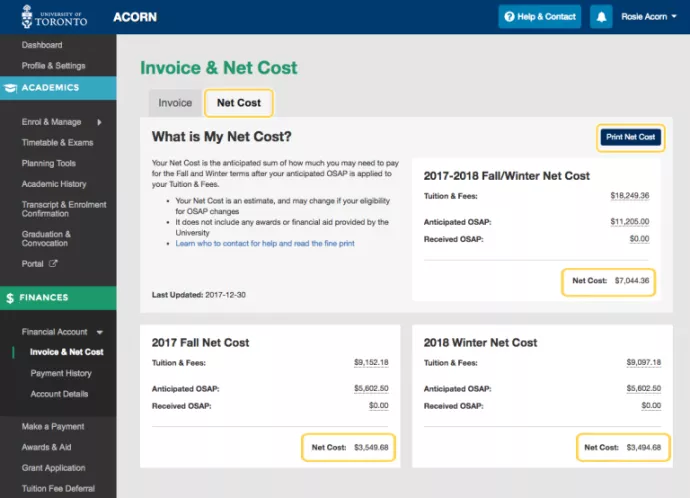
ACORN's Net Cost feature will display important information for full-time OSAP students. This includes:
- Tuition & Fees: Your U of T tuition and fee charges.
- Anticipated OSAP: the amount of OSAP funding that will be paid directly to your student account.
- Received OSAP: confirmation of the total OSAP amount credited to your ACORN account
- Net Cost: this amount indicates whether there is a remaining balance that you will need to pay out of pocket. You can view your annual net cost for your combined Fall and Winter owing balance, or by term (i.e., two separate amounts for each Fall and Winter term.)
The Net Cost feature is available only for students receiving full-time OSAP, and excludes University of Toronto awards or financial aid, the Ontario Living OSAP grant, the Learning Grant (for Crown Wards only). Part-time students will not see a net cost option on ACORN.