



There are different options available to make it convenient for you to pay your tuition fees through your bank or financial institution. Follow the four easy steps to paying your fees in order to register for the upcoming session:
Step 1.
Check your Invoice
Before classes begin, your first tuition payment is known as the 'minimum amount to register'.
You can find this amount on your ACORN invoice. Here's an example.
Step 3.
Wait 2-4 Business Days
Payments do not process immediately, and that is okay!
Step 4.
Check Your Registration Status
If your status is registered, you're all set!
Follow the payment schedule once classes begin.
Missed the deadline?
Make your payment as soon as possible. Submit your proof of payment by following these steps.
Tuition Invoice & Minimum Payment Amount
Before classes begin, your first payment will secure your registration for the upcoming year. To make a payment, you will need your account number and the minimum payment to register amount listed on your ACORN invoice.
To find your invoice, log in to ACORN, click on the Finances menu, and select the "View invoice" button.
Please note that invoices are not mailed.
Your account number is on the on the upper right hand corner of your invoice, and it is a combination of the first 5 characters of your last name, and your student number. Be sure to distinguish between a zero and the letter "O".
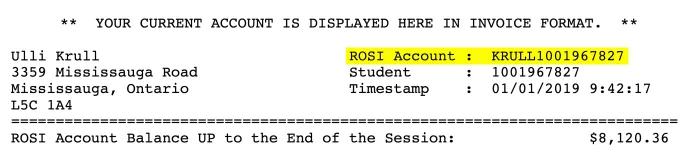
Your account number tells your financial institution where to direct your payment, and more specifically, ensures that your payment to the university goes to your account.
Your first payment is equal to the cost of one term. This is called your minimum payment to register, and it is clearly listed at the bottom of your voice:

You can also calculate your minimum payment by adding up the sub-totals listed on the right side of your ACORN invoice:
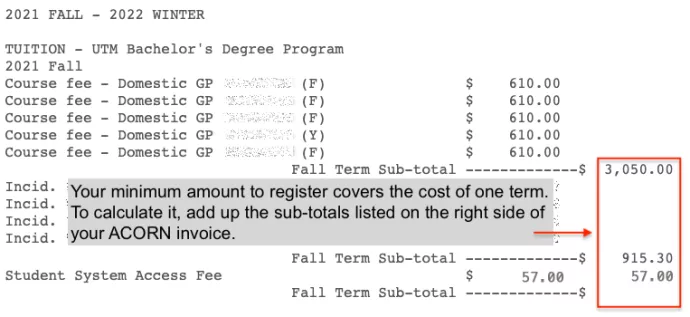
The examples above are for illustrative purposes only. Please refer to your personal ACORN invoice for your minimum payment to register amount.
Calculating Your Remaining Fall Balance
After you've made your minimum required payment or arranged a deferral, you'll need to pay any remaining fees on your account, starting with your Fall balance.
To calculate your remaining balance for the Fall term, subtract tuition and non-tuition charges for the Winter term, and any U of T scholarships.
As an example calculation, your ACORN invoice could display the following:
- Account balance up to the end of the session (Fall and Winter): $12,000
- Total Winter term tuition charges: $5,000
- Total Winter term non-tuition charges: $900 (incidental fees) + $3,000 (residence fees) = $3,900
- Fall scholarship: $2,000
Calculation: $12,000 – $5,000 – $3,900 – $2,000 = $1,100
In this scenario, you would owe $1,100 for the Fall term.
Payment deadlines and information on service charges can be found on the payment schedule.